
Glossary
Your Encyclopedia for Labels!
Even in label printing, there are a large number of technical terms that may not always be immediately understandable. Below, you will find a collection of these terms together with explanations. For example, terms relating to the structure of print data and the production sequence of your labels are explained in detail.
A-C
Amazon Transparency
Transparency by Amazon is a product serialisation service that helps identify individual units and proactively prevent counterfeits from reaching customers. You can order Transparency codes via Amazon. Each individual unit of your product will receive its own code. Next, create an account at unieketiket.nl. This will allow you to order your Transparency labels directly online. Once your account is ready, you can order the product labels containing the Transparency codes.
Bleed (around the entire design)
The bleed is a 2.5 mm margin around the design, which must always be part of the label design.
The background image or color of the label extends into the bleed. This is to prevent white edges from appearing during die cutting. This can happen if the (mechanical) die cutting machine deviates even a fraction of a millimetre from the specified die cutting contour, which is a normal, unavoidable characteristic of machine die cutting.
Please note that the 2.5 mm bleed must always be defined in your print file, even if you do not have a background that extends to the edge of the label.
See the page delivery instructions for how to define the bleed.
Alternating labels (alternating on the roll)
In principle, we can supply your front and back labels alternating on the same roll. We call this alternating labels (alternating) on a roll. It does not matter whether the labels are the same size or different sizes. We then consider both labels as 1 customized label format.
For further information and instructions, please contact our customer service.
Protective varnish
Protective varnish acts as a protective layer over the label and prevents premature wear. We recommend that you always order a protective layer with your labels, with varnish being the most commonly used option.
Protective varnish is available in matt or gloss. We recommend choosing the varnish based on your material: for matt materials, use matt protective varnish; for glossy paper or foil, use glossy varnish. This preserves the appearance of the label and the material.
Another advantage of protective varnish: self-adhesive roll labels finished with varnish are also suitable for subsequent printing with a thermal transfer printer.
Black mark / black marking
A “black mark” is a black marking on a label (often on the backing material).
This marking, which is applied to each label, ensures that finishing or labelling machines with an optical sensor can detect when the next label on the roll begins.
This marking solves the problem that exists especially with transparent labels on rolls – with a transparent backing – where the optical sensor cannot detect the start of a label. A black mark offers a solution here.
Unfortunately, it is not possible to print on the back of transparent (PET) carrier material. Instead, an “insetting web” with a black mark can be used.
An insetting strip is an extension of the label, i.e. an extra strip added to the label with a black mark. This strip can be applied above or below the label. Important: the strip is included in the final format and in the order.
For further information and instructions, please contact our customer service.
Blind embossing (also known as: Dry embossing)
Applying a relief to a label (or other printed matter) is called blind embossing. The relief is applied to selected patterns, fonts or motifs in the printed matter. These elements then protrude slightly from the label. This form of embossing is called “blind” because, unlike hot foil stamping, no (metallic) foil is applied to the label. In blind embossing, the paper label material is “deformed” three-dimensionally using a special printing plate. This makes the embossed design tactile. A real advantage for emphasising the qualities of your own product.
See also: Embossing
CMYK
The CMYK color model forms the basis for four-color printing. Cyan (blue), Magenta (pink) and Yellow (yellow) are the three color components, supported by the “Key plate” black. By combining these four colors, other colors can be “mixed”.
CMYK four-color printing is used for digital printing, which enables a faster and cheaper printing process without compromising on quality.
Conventional die cutting
Die cutting is the process of cutting labels to the exact size and shape.
The conventional die-cutting method requires a specially made die plate to cut out the labels. This “die cutter” must then be applied to the so-called die cylinder in the finishing machine. The cylinder rotates and die-cuts the desired label shape from the material.
Compared to the alternative, “laser die cutting”, conventional die cutting is more expensive for smaller print runs, but produces “sharper” cuts.
D-F
Opaque white
One characteristic of digital printing is that it is translucent. To make digital color printing appear brilliant and vivid, a white background is required. In most cases, this white background consists of white paper or white PP or PE film.
However, there are a number of materials that are not white, such as dark paper (e.g. grass paper and kraft paper) and transparent film. To achieve a solid color result on these materials, we first print a white layer: the so-called “cover white” or “opaque white”, and then the color layer. It is also possible to leave the white white, for white text or images, or as a background for a barcode or QR code.
For silver-colored material, opaque white is also used to create a white background for barcodes, but also to block the silver color on parts of the label where no metallic effect is desired.
Incidentally, the color black (with CMYK color code 0/0/0/100) also completely covers silver material, so no opaque white is necessary for transparent material under black (with color code C:0% M:0% Y:0% K:100%).
Opaque white must also be formatted in your print file: follow the instructions found here.
Finally, when ordering, do not forget to select “opaque white” in the calculator. The option appears as soon as you select a material for which opaque white is relevant.
Deep black
To achieve a deep black print result in digital printing, we recommend using the following color values for black in the print file: C:0% M:0% Y:0% K:100%.
For an even more intense and deeper black, it is also possible to order “double hit” black to create a particularly deep black.
Digital printing
Digital printing is a modern form of printing that is more versatile and efficient than traditional printing techniques.
We use HP Indigo printing machines, which convert your print file directly into a printed label without the need for physical printing plates and multiple print runs.
The advantages of digital printing are:
- faster production: time-consuming machine settings are no longer necessary
- cheaper, even for smaller print runs
- more flexible: multiple print variations and individually personalised labels
And all this without compromising on quality!
Digital spot varnish
With digital spot varnish, also known as spot varnish, selected parts of the (printed) label surface are finished with varnish, giving them a visual and tactile accent compared to the rest of the surface. Our digital spot varnish sets a new standard for exclusive finishes and gives your products a unique and distinctive look. Thanks to our digitally controlled finishing machine, the varnish can be applied exactly where you want it, without the need for special tools. This saves costs, time and resources!
For more information, see our page Digital Finishes
Direct thermal labels
Direct thermal printing uses special paper that is saturated with color pigments. The print head of the direct thermal printer moves across this special paper and heats the heat-sensitive surface. The areas where the paper is heated turn black. This creates the desired pattern or text on the paper. Grey tones are very difficult to achieve with this printing method. Printing is only possible in monochrome black. Because direct thermal printed products have low UV resistance, they fade quickly or turn completely black when exposed to high heat. Direct thermal labels are often used for receipts, admission tickets or parking tickets. In addition, only special paper can be used for direct thermal printing, which greatly limits the design possibilities of the print.
Double hit/double printing
“Double hit”, or double printing, means that we apply the colors black or white twice during the printing process to increase the opacity. This gives you a particularly bright white or an extra deep black.
Please contact our customer service to activate the “double hit” function in your account. The option can then be selected in the calculator once you have logged in to your account.
DPI
DPI stands for “dots per inch” and indicates the resolution when printing. During the digital printing process, your label design is converted into small dots (“raster”).
To enable us to print the design in the best possible quality, your print file must meet certain minimum resolution requirements:
- Minimum resolution: 250 dpi
- Standard resolution: 300 dpi
Backing
By “backing material” or “backing tape”, we mean the material to which the labels are adhered, i.e. the material that remains after the label (or sticker) has been removed.
The backing material usually consists of glassine paper, which is a very smooth paper.
Transparent PET carrier material is used to a lesser extent as carrier material: for example, for the transparent “No Label look” PP50 material. In the calculator, you can see in the materials list whether a material has a PET carrier.
Print files
A correct and error-free print file in PDF format is a prerequisite for the efficient and fast processing of your order.
Therefore, ask your designer to apply our delivery specifications for print files to your label design. Follow these guidelines and you can be sure that the label will look perfect.
Still can’t figure it out? No problem, we offer a print file service, which can be ordered with your order. Our professional graphic designers will then prepare your print files for printing!
Don’t have a design or a designer yet? We can also design your labels!
Our design service for labels offers you the opportunity to have a professional label designed by one of our graphic designers according to your specifications and wishes. After completing the online form, you will have a briefing with our graphics department, where all remaining questions will be answered and suggestions exchanged. A graphic designer will guide you throughout the entire project and stay in constant contact with you.
Final format
The final format is the format that your label should ultimately have. When placing your order, you specify the final format (in the calculator). This format is specified as follows: width x height in mm.
NB: When placing your order, you can therefore disregard the extra space around the label for the bleed. Of course, the bleed must be included in your print files. Please refer to our delivery specifications for more information.
Film lamination
Do your labels need special protection or a special shine? This is where film lamination comes into play. This involves applying a special protective laminate to the labels, which is available in glossy or matte. Compared to normal protective varnish, the lamination is slightly thicker and much more resistant.
This finish will catapult your product into the top class: thanks to the lamination, the design and colors of the label are even more eye-catching. You will be amazed at what a big difference the 12 µm thin film can make. You can select this and many other finishing options and materials directly in the online calculator. Give it a try!
Hot foil stamping
Hot foil stamping, also known as foil printing or just hot foil, makes your label very special. Hot foil stamping uses heat and a special tool to press the foil onto your labels. The resulting shine is unique and provides a beautiful contrast between the material and the foil. It also sets your label apart from the competition. Hot foil is often used for beverages, such as wine or spirits, to give them a more luxurious look. Hot foil stamping is available in a wide range of colors and metallics, such as bronze, silver, gold, blue or even mint green or pink.
Want to see what hot foil stamping looks like “in real life”? Order our free sample book with various examples.
FSC
FSC, which stands for Forest Stewardship Council®, is an international, non-governmental, non-profit organisation with the aim of managing the world’s forests in a way that meets the needs of the present without compromising the future of coming generations.
Almost all paper types at unieketiket.nl are FSC®-mix certified, which means that the paper is made from wood consisting of materials sourced from exemplary managed, FSC®-certified forests and other controlled sources.
You can easily recognise our FSC papers in the materials list in our calculator: All certified materials are marked with the addition ‘FSC® Mix Credit’.
For more information, see our page FSC® certified materials.
G-I
Reprint
Would you like your new order to be printed according to the specifications of a previous order? No problem. Contact our Customer Service to request a reprint of your labels and indicate any changes that need to be made. If the order meets the required specifications, we can guarantee the color match as accurately as possible by using a sample from the previous print run. If the specifications are not met or if no sample is available, slight color variations may occur between productions.
To confirm the required specifications or provide us with a sample, you can reach us by telephone from Monday to Friday, from 9:00 a.m. to 5:00 p.m., on (+31) (0)30 808 05 97 or by email at info@unieketiket.nl.
Reprinting – when colors are important
When reordering a previously printed label, would you like to be sure that the same colors are printed as in the previous production run? If we do not have a sample, we will print as standard and without further color corrections. This may result in color variations from order to order.
In order to match the colors as accurately as possible during printing, we require a color sample from a previous order. We do not keep samples of printed labels as standard. If you would like to have a color match done, you can send us a sample of your label. Please do this in consultation with our customer service team so that we can coordinate the reprint.
NB: Color matching is only possible if you select the “conventional” die-cutting method when placing your order.
If you are not given the choice between two die-cutting methods when placing an order, and you are ordering a large number of labels, your labels will automatically be produced using the conventional method. To be sure, check your order confirmation or contact us.
Have you recently had a BASIC proof made? We keep a color sample of your proof for 3 months and can match the colors to the proof sample for your next order. (Only if you choose the conventional die-cutting method).
When reordering, please state the order number (NLJ-..) of the proof with the comment “match colors to proof” in the comments field in the second step of the order process. If necessary, also state the type of label and the most important color that needs to be matched.
Always take the following into account:
1) With digital printing, despite color matching, the colors may vary slightly in subsequent productions.
2) Even when protective varnish or foil laminate is applied, the colors of the label will differ slightly from the colors of a Basic proof. Protective varnish will make the colors slightly more yellow and foil laminate will make the colors slightly darker.
HP Indigo
Digital printing with HP Indigo printing machines is impressive not only because of its short production times, but also because of its brilliant colors, high resolution, easy personalisation and offset-level print quality.
We have relied on proven HP technology since our company was founded. It is not only the high offset-quality print quality that speaks for HP and its digital printing machines. Another advantage is the ability to automate production, which not only saves production time but also conserves resources, for example, by reducing print waste. The labels produced using digital printing impress with their high precision, short production times and excellent price-performance ratio, even for small print runs.
Compared to conventional presses, HP machines have many more advantages. For example, each label can be printed differently, which can be used for barcodes, numbering or individual addresses.
If you would like to see the print quality of the Indigo machines for yourself, request our free sample book with sample labels.
J-L
JPG
In the field of photography, the JPG standard has been an indispensable standard since 1992. The format is widely compatible and easy to use. This is not a problem for photos. However, it becomes difficult when entire labels need to be printed in this format. In a JPG file, each pixel is stored flat as a fixed pixel element. This means that individual parts of the image can only be changed rarely and with difficulty. In addition, the print quality, especially for fonts and fine lines, may not be optimal.
For these reasons, we ask you to send us your print files in the standardised PDF format.
We have compiled all the information you need about submitting print files on the page ‘Submission instructions’.
Laser cutting
With laser cutting, the label is cut to size and shape using a laser beam. This hits the material and cuts it into the correct shape. Unlike conventional cutting, no cutting die is required.
Advantages
More flexible, as no special cutting die needs to be ordered and placed in the cutting machine. Any size can be produced immediately. Cheaper for smaller print runs, as less time and material is required for set-up.
Disadvantages
Label designs with a dark color on the outer edge may result in “white edges”. This phenomenon is particularly noticeable when the label is affixed to a dark background.
For larger formats, two laser beams are used for cutting. It is possible that these do not match 100% precisely, resulting in a small edge.
More complex custom shapes may not be cut out correctly. For example: sharp corners.
Only a limited number of materials are available for laser production.
More information and a comparison with our conventional production can be found here: our two die-cutting methods
Different types of adhesive
unieketiket.nl produces self-adhesive labels.
The requirements for the adhesive strength of labels can vary depending on the industry and product. At unieketiket.nl, you can choose from different types of adhesives: permanent, extra strong, removable adhesives or labels with adhesives for special conditions such as use in the freezer.
Unieketiket.nl offers the right adhesive for every application and every product. For your information: most of our materials in the calculator are permanently adhesive as standard. Of course, many other materials are available on request – please feel free to contact us and we will advise you on our label materials and adhesives that suit your application and product.
Please note: not every adhesive is available with every material. Special adhesives are only available in combination with one or a few materials.
For more information: Types of adhesive
M-O
No-label look
No-label look labels are printed, transparent, self-adhesive labels that are barely visible: it looks (almost) as if the information and images have been printed directly onto the packaging. To achieve this effect, crystal-clear film is used in combination with a completely clear adhesive.
Would you like to order the transparent PP material with a no-label look? Then select PP film transparent 50 μm (PET transparent carrier) in the calculator.
Please note: matt protective varnish or matt foil laminate make the label less clear! For optimum protection of your No-Label-Look labels, choose protective gloss varnish or gloss foil laminate.
Another tip: labels with a no-label look are best applied by machine to avoid air bubbles and structure formation of the adhesive.
Offset printing
Conventional offset printing (from the English ‘set off’) is a printing technique in which the design to be printed is transferred to the material via aluminium printing plates. A separate printing plate is required for each color in the design. The printing plates are then placed in the printing machine and the different colors of ink are printed onto the substrate (the material to be printed, usually paper or foil) in separate printing runs. The printing plates and substrate do not come into contact with each other; the ink is transferred to a rubber band. This band then transfers the ink to the substrate.
Due to the high start-up costs, offset printing is particularly suitable for large print runs.
Incidentally, in terms of quality, digital offset printing via HP Indigo and conventional offset printing are virtually indistinguishable.
Weeding
When labels are die-cut, material residues remain around the die-cut shape. Removing these residues from the backing material is called “weeding”.
Weeding is particularly necessary in order to be able to process the labels by machine. At unieketiket.nl, all labels are de-rasterised as standard.
Opaque white (covering white)
One characteristic of digital printing is that it is translucent. A white background is needed to make digital color printing appear brilliant and vivid. In most cases, this white background consists of white paper or white PP or PE film.
However, there are a number of materials that are not white, such as dark paper (e.g. grass paper and kraft paper) and transparent film. In order to achieve a solid color result on these materials, we first print a white layer: the so-called “cover white” or “opaque white”, and then the color layer. It is also possible to leave the white as white, for white text or images, or as a background for a barcode or QR code.
With silver-colored material, opaque white is also used to create a white background for barcodes, but above all to block the silver color in parts of the label where no metallic effect is desired.
Incidentally, the color black (with CMYK color code 0/0/0/100) also completely covers silver material, and opaque white is not necessary for transparent material under deep black.
Opaque white must also be included in your print file: follow the instructions found here.
Finally, when placing your order, don’t forget to select “opaque white” in the calculator. The option will appear as soon as you select a material for which opaque white is relevant.
Overlabelling: covering labels or correction labels
Do you need a label to stick over text or (part of) another label?
Then you need a label material that does not show through, opaque labels.
We have such material in our range: both a paper version and a (plastic PP) foil version. Both materials have a non-transparent backing and can be printed with any design or text.
Please contact our customer service for more information, or to request a sample or quotation.
P-R
The PDF format is a universal file format. It can contain both images and text and can be opened independently of the operating system or end device. The printing industry mainly uses this format.
Print files are very important and even essential for the production of your labels and stickers. All subsequent steps are based on your PDF print file, and for perfect print quality and a smooth production process, it is important that your PDF print file is created correctly. That is why we ask you to supply the print file in PDF format.
See here for the delivery instructions for your PDF design files.
Plus materials – for use in ice buckets
Do you need labels for champagne or other sparkling wines that will be used in an ice bucket? Or do you have a more luxurious product whose packaging must also remain perfect in the refrigerator?
Then you need one of our “plus papers”. These have been specially developed for labelling wine bottles and high-quality products. Their special feature: a PET reinforcement between the adhesive layer and the top material. This minimises the risk of creasing and improves wet performance. Plus materials are therefore ideal for sparkling wine, wine, spirits and other products that are chilled or presented in ice buckets. The materials can also be combined perfectly with more luxurious finishes.
In our calculator, you will find a number of plus materials that you can order directly.
However, we have even more premium material options in our range, so if you are looking for a different premium material or would like a quote, please contact our customer service team.
Proof
Want to make sure your printed labels look perfect before you order them? Is a special color important, or would you like to see what your design will look like on the material of your choice? Then take advantage of our proof printing service! For a reasonable fee, we will print your label design on the original machines and on the material of your choice. You have the following options:
With the Basic proof, the labels are not cut to size and we do not apply any varnish or foil lamination.
- We print your design with the die-cut line on the chosen material
- and then send it on a sheet, without further processing
- You will receive approx. 5 pieces on a sheet (per type).
The printed die-cut line allows you to cut out the label in the exact size and then stick it on your packaging. This is useful if you want to test whether the label looks good on the packaging in terms of size, material, colors, etc.
For the Premium proof, we produce your label design with foil embossing or blind embossing and, if desired, with a protective varnish. We also cut the labels to the desired shape and size and deliver them on a roll. You will receive approximately 30 labels.
Halftone dots
In digital printing, an image is divided into small dots, also known as halftone dots. These dots are printed in one of the four CMYK colors. Each color dot has its own coverage percentage. The higher the coverage percentage, the darker the color becomes. By combining the different colors and coverage percentages, (almost) all colors and shades can be created.
The dots are then printed in a pattern that mimics the image. By placing the dots close together, in the right color combination, the eye creates the illusion of a continuous color or image, a pattern that mimics the image.
Embossing
Embossed printing combines blind embossing and hot foil stamping. This means that the material is “multidimensionally” deformed in the place of the desired design element using a special customised printing plate and then (optionally) finished with foil embossing in the desired color. The deformation can be positive (upwards) or negative (downwards). For self-adhesive labels on rolls, only positive embossing is possible. The advantage of relief embossing is that individual design elements can be embossed at different heights, creating different levels. This makes the element tangible and creates an exciting 3D effect. In principle, all design elements can be emphasised in relief printing: letters, a logo, individual structures or even entire surfaces. You can also choose to have some elements foil stamped and others not. There are no limits to your creativity!
RGB
RGB stands for Red, Green and Blue. It is a color model used to describe colors produced by light. RGB is used for digital screens, such as computer monitors, televisions and smartphones.
RGB is mainly used for digital screens because it can reproduce colors that the human eye can see. The light emitted from the screen plays an important role in the display of colors. The display of RGB colors can also vary from screen to screen. The resolution of the screen, the ambient light and the viewing angle can influence the display of colors on a screen.
CMYK, another color model, is used for printing because it can reproduce colors that the human eye can see when printed on paper.
Roll diameter
The roll diameter indicates the maximum size of the diameter of a roll of labels. You can specify this value when ordering your labels on a roll, under the heading “processing” in the second step of the ordering process.
Please note: additional costs may apply.
For the correct maximum diameter, please consult the user manual of the labelling machine that will be used to process your labels in advance.
The maximum roll diameter indicates the maximum size of the rolls to be delivered. However, this means that the rolls can also be delivered with a smaller diameter.
If a fixed roll size must be maintained for all rolls, you must specify the number of labels per roll.
For more information, see: Roll configuration
Roll labels
Roll labels are often also referred to as labels on a roll, roll labels or self-adhesive roll labels. As the name suggests, roll labels are wound onto a roll. Nevertheless, the labels can be designed freely and individually according to your specifications and requirements. Labels on a roll are particularly suitable for machine processing.
More information about labels on rolls
If you apply your labels to the product by hand, you may also want to consider ordering your labels or stickers on sheets.
Roll core diameter
We supply labels on rolls with a standard roll core diameter of 76 mm = 3 inches.
However, we can also produce your labels or stickers with:
- a roll core diameter of 25 mm = 1 inch
- a roll core diameter of 40 mm = 2 inches
Please note: additional costs will be charged for this.
Before placing your order, please check which roll core size is used by your processing machine.
You can specify which roll core you need in the second step of the ordering process: under the heading “processing”,
For more information, see: Roll configuration
S-U
Sandwich printing
What is sandwich printing? Sandwich printing involves printing a label made of clear, transparent “no label look” PP film in multiple layers with a design that is visible from the front and a design that is visible from the back. This creates a double-sided label that can still be used as a self-adhesive label.
By leaving parts of both sides of the label unprinted, this technique can be used to create special effects: for example, an unprinted section can act as a “window” offering a glimpse of the back label.
Tip: It is always recommended to use the label in combination with a clear, transparent bottle or jar.
See also the example on the left, where one side of the bottle has no label, revealing the back of the sandwich label.
Sandwich printing makes it possible to combine the front and back of a label in a single label. This also makes it an alternative to double-sided printing.
Die cut line
The die-cut line marks the final format/outer edge of the label. The die-cut line must be created as a spot color and must be named “Die-cut”. It must also be set to overprint, as the die-cut line is a technical aid that is not printed.
Please refer to our delivery instructions for more information about the layout of print files in general and the die line in particular.
Thermal transfer labels:
With thermal transfer printing, heat is used to transfer the color pigment from a thermal transfer ribbon onto the label material. This printing method is ideal for printing barcodes, bottling information or expiry dates. For thermal transfer printing, you need a special thermal transfer printer with a high-quality thermal transfer ribbon. The printing technology only allows one color to be printed at a time – namely the color of the ribbon used. Thermal transfer printing delivers much higher quality and a longer service life than direct thermal printing. Thermal transfer labels can be used to label food products, equipment or other products. Time- and product-specific data can be overprinted with the thermal transfer printer.
Spacing – the space between the labels on the roll
The spacing is the distance between two labels on the roll. We produce your labels on rolls with a standard spacing of 5 mm.
On request, we can supply labels on rolls with a different spacing, but always in whole millimetres.
We recommend a minimum spacing of 3 mm. With a spacing of less than 3 mm, we can no longer remove the grid (the material surrounding the labels). Please contact our customer service department for more information.
NB: if you choose the “laser” die-cutting method, it is not possible to adjust the spacing.
V-Z
Safety margin
The safety margin is a 2 mm zone within the edge of the label/die-cut line.
Make sure that there is no text or other important elements in this zone, as these could be (partially) cut away if there is a slight deviation when die cutting (cutting out) the labels. Die cutting is a mechanical process in which small deviations are possible.
Do you have a frame around the outer edge of your label or sticker? Make sure it is at least 2 mm wide.
However, it is better to make the edge even thicker to prevent optical differences between opposite sides in case of minor shifts during die cutting.
See also our page: delivery instructions
Winding direction
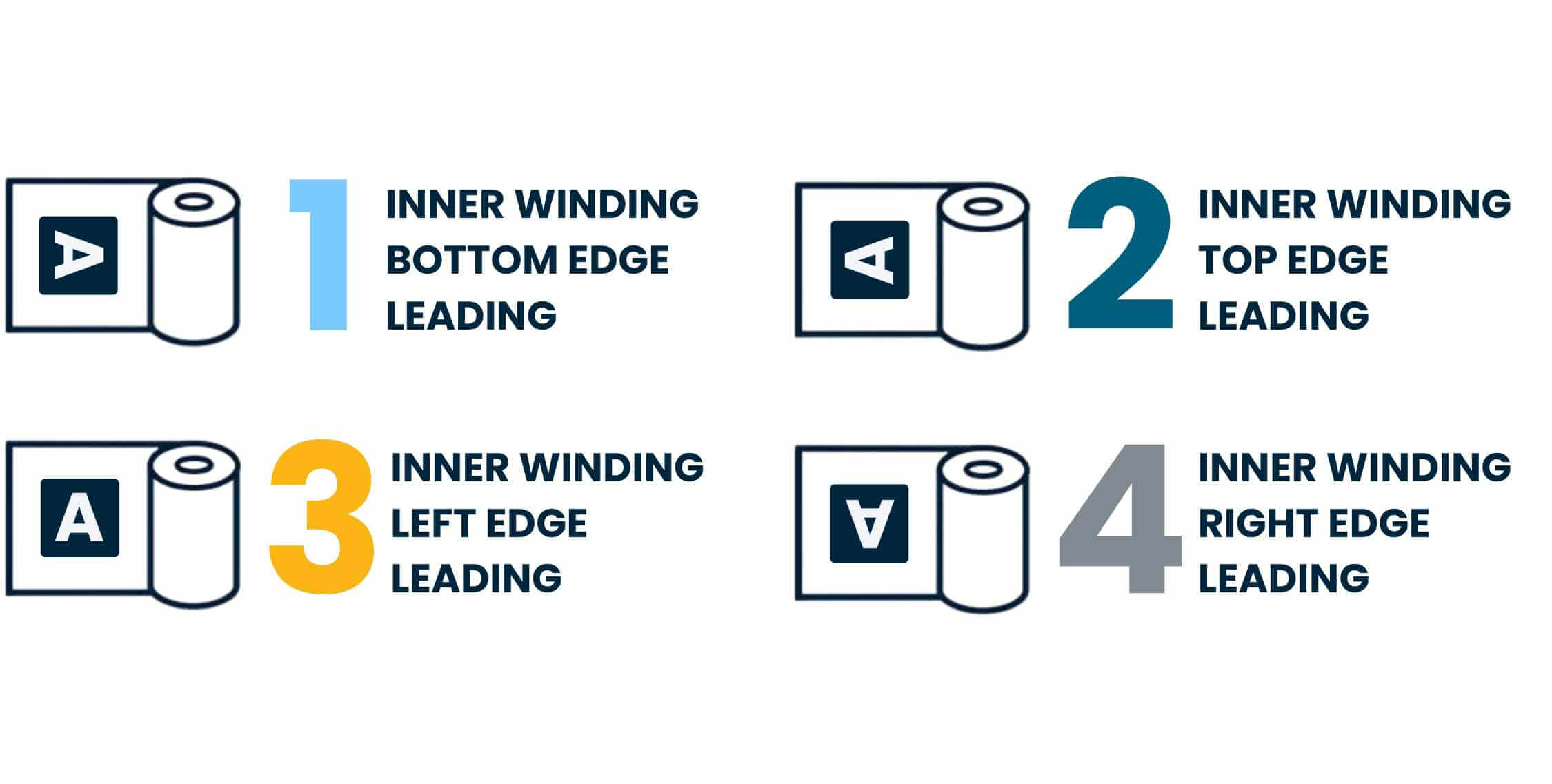
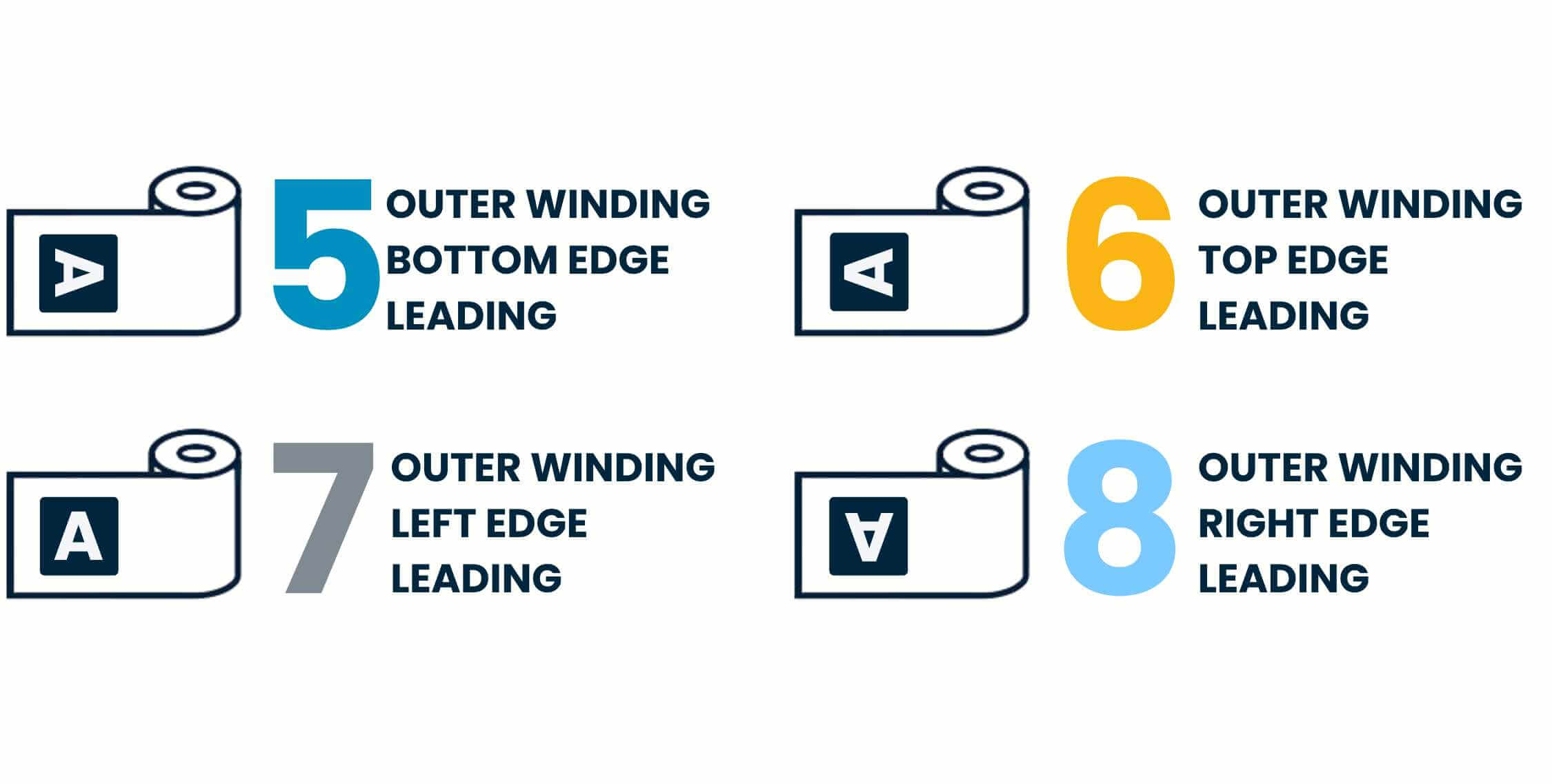
If the labels on rolls are processed by machine, it is important that the correct winding direction is specified when ordering.
There are basically two types of roll winding for labels on rolls.
Namely, printing on the INSIDE (inside winding) or printing on the OUTSIDE (outside winding).
It is also important to distinguish the positions of the labels on the roll. There are therefore four variants in total:
- Bottom first
- Top first
- Left side first
- Right side first
For more information: Roll winding
Self-adhesive labels
Self-adhesive labels on rolls can be applied either manually or by machine. Labels on sheets can only be applied to a product manually. You will find printed labels in all industries and sectors.
unieketiket.nl offers self-adhesive labels on rolls and on sheets.
For more information: self-adhesive labels.
Self-adhesive labels: what different types of adhesive are there?
unieketiket.nl produces self-adhesive labels.
The requirements for the adhesive strength of labels can vary depending on the industry and product. At unieketiket.nl, you can choose from different types of adhesives: permanent, extra strong, removable adhesives or labels with adhesives for special conditions such as use in the freezer.
unieketiket.nl offers the right adhesive for every application and every product. For your information: most of our materials in the calculator are permanently adhesive as standard. Of course, many other materials are available on request – please feel free to contact us and we will advise you on our label materials and adhesives that suit your application and product.
Please note: not every adhesive is available with every material. Special adhesives are only available in combination with one or a few materials.
For more information: Types of adhesive