
Why QR code stickers?
QR codes can of course replace traditional barcodes, but QR codes can do much more: they can quickly link to information found on the Internet. For example, after scanning the QR code, customers can immediately find out more about your company, your products, special offers, and so on. So a QR code can be an important marketing tool as well as saving space on your product labels. The application areas for QR codes are enormous: QR codes can be integrated on your product label or stuck as a separate sticker on products or leaflets. The practical and also creative possibilities are endless. Whether practical or creative, we at unieketiket.nl are very experienced in printing stickers with QR codes and would be happy to help you realize your QR code concept, your labels, tags and stickers.
Personalization with QR codes: each label unique
The versatility of QR codes makes them ideal for all kinds of fun applications. Combined with our digital printing, personalization of each individual label is also possible: we can print a unique QR code on each label, hiding , for example, a unique number that determines whether a customer has won “something. The possibilities are endless. We are happy to leave the creative part of the possibilities personalization offers to you. All we need is an Excel list with the individual codes. This makes each label personal and unique! QR code labels offer many opportunities for creative marketing of your products. Convey diverse content and surprise your customers in a personal and innovative way.
Technical tips
Code format: QR codes can be printed in any format. The most important thing is that they are easy to read so that they can be scanned properly. Although theoretically all sizes are possible, we therefore recommend that you use a minimum size of 10x10mm for the QR code itself. Which material is suitable? In principle, you can choose any of our label materials for your stickers and labels with QR codes. If you choose a silver or transparent material, we recommend using a white background for the QR codes to improve readability. In the print file, this requires the background of the code to be formatted in “deck white” as described in our print file instructions. How should the QR code be inserted in the print file? If you want to be on the safe side, our artwork service is at your disposal. The Pro package also includes deck white formatting and QR code generation. Even if you have doubts about the size, contrast or overall readability of the code, you can use the expertise of our artwork service. Can I generate a QR code myself? Yes, you can also generate a QR code yourself with a QR code generator, for example a code that links to your website, or a special page. Then integrate the generated QR code into your print file, place your order and you will receive your labels or stickers with your own QR code as soon as possible.
Wine labels: e-label with QR code
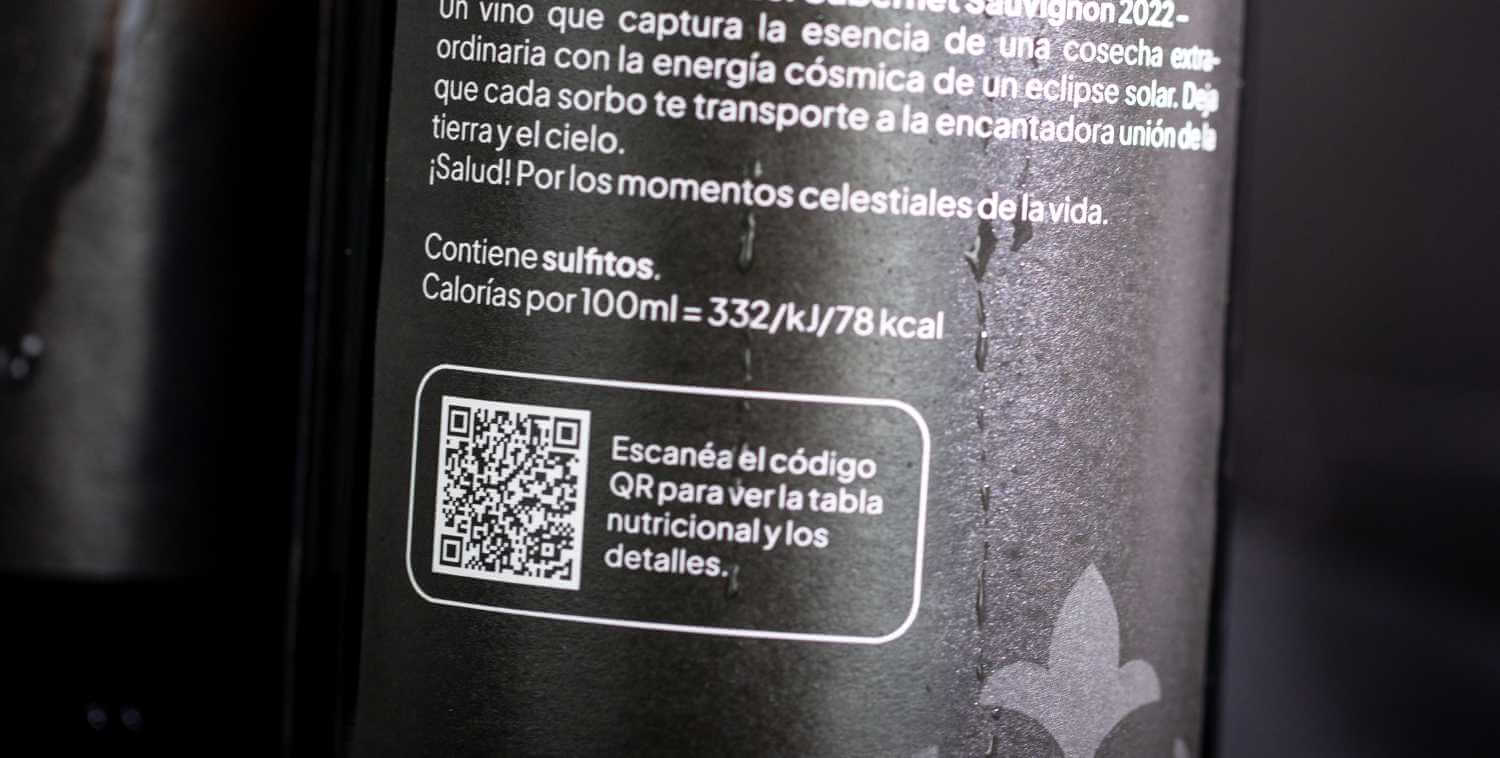
As of early December 2023, QR codes on labels are gaining relevance and popularity. As a result of a new EU regulation that came into force at that time, wine producers, bottlers and retailers will be required to include information about ingredients, energy content and nutritional values on the wine label. This information can be displayed on your label by including the text of the mandatory information on the label, or you can opt for the innovative e-label. The e-label is a label with a QR code instead of the text with mandatory information. When customers scan the code on the wine label, they are taken to an online view with all relevant information about the product.
Amazon Transparency
Amazon Transparency is a service that helps protect your customers from counterfeit products. It is used to identify individual products and units using a sticker with individual QR codes. As an authorized provider of Transparency services, unieketiket.nl uses modern digital printing machines to ensure that data and codes are printed with extreme precision and in high resolution. Learn more about Amazon Transparency.
QR code labels: an overview
Why?
- alternative to the classic barcode
- more creative freedom thanks to space saving
- Personalization offers new and unprecedented opportunities for marketing campaigns.
- For wine labels: e-label
- Amazon Transparency
- Augmented Reality: digital labels
How?
- applying personalization
- recommended minimum size of the QR code to be placed on a sticker or label: 10x10mm
- Use deck white with transparent and silver materials.
- Pro package of our artwork service
Questions? You can reach us by telephone on (+31) (0)30 808 05 97 or by email: info@unieketiket.nl.
Useful tools and services
Proofing service
Want to make sure your printed labels look perfect? We print the design of your label as a proof on the original machines and on the material of your choice.
Our free sample book
Are you looking for the right material for your labels? Order a free copy of our materials book and convince yourself of the quality of our printing!
Artwork service
We professionally prepare your print file(s) for you so that they meet all our requirements for printing. Order one of our artwork service for this purpose!